
Stock and availability
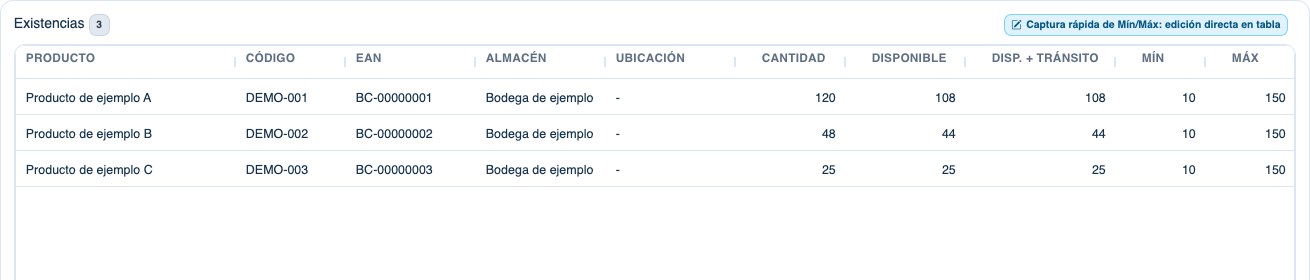
View quantities, reservations, goods in transit and availability by warehouse and location. Review minimum and maximum levels to plan replenishment.
SOLTECHN ERP · Inventory
Manage warehouse stock, receipts, issues, transfers and counts. Connect inventory with purchasing, sales and POS in SOLTECHN ERP for Honduras.
Ask about this solutionFeatures
View quantities, reservations, goods in transit and availability by warehouse and location. Review minimum and maximum levels to plan replenishment.
Record receipts, issues and transfers. Compare physical counts with recorded quantities and review adjustments, responsible staff and source documents.
Link purchase receipts and confirmed sales with stock. Review costs and traceability through the modules configured for your operation.
Inside SOLTECHN ERP
Identify products, warehouse and quantities in the stock view. Review availability before preparing a purchase or transfer.
A connected workflow
Review products, units and received quantities. Record the receipt in the appropriate warehouse and location, with its source document.
Check availability before selling or transferring. Track the transfer and its receipt; confirmed movements update stock.
Prepare a physical count, enter counted quantities and compare differences. Confirm adjustments with responsible staff and retain their traceability.
In daily operations
Gather codes, names, units and reference costs. Define warehouses, locations and responsible staff before loading data.
Agree on a cutoff date and review opening stock. Test a receipt, transfer and count with sample data before going live.
Define the connections with purchasing, sales or POS, the data to migrate and training. Included modules and extras are detailed in each quote.
Before implementation
Yes. View stock and movements by warehouse and location, within the company and branches authorized for each user.
Confirmed receipts and transactions feed inventory according to the configured modules. In a demonstration, we can review purchasing, receiving and a POS sale.
Minimum and maximum levels can be set for each stock record. The critical-stock list and configured notifications help identify replenishment needs.
Yes, within the implementation scope. We review products, units, warehouses and balances before agreeing on loading and validation; historical data is assessed separately.
The product catalog supports barcodes. If you plan to use scanners, share the model and connection method so entry in the browser and the required workflows can be tested before activation.
The pricing page shows the current per-user rate. Included modules, extras, migration, training and implementation are defined in each quote for your operation in Honduras.
Your implementation