
Sales and payments at the register
Select products and customer, review quantities and discounts, and record enabled payment methods. Keep payment references with the sale.
SOLTECHN ERP · Point of sale POS
Record sales and payments, manage cash sessions and view receipts in SOLTECHN ERP. Connect your point of sale with inventory and invoicing in Honduras.
Ask about this solutionFeatures
Select products and customer, review quantities and discounts, and record enabled payment methods. Keep payment references with the sale.
Work by terminal and cash session. Review expected and counted amounts at closing; view sales and receipts according to each user’s permissions.
Confirmed sales update stock and reports. Configure document issuance and review each return or void through its corresponding workflow.
Inside SOLTECHN ERP
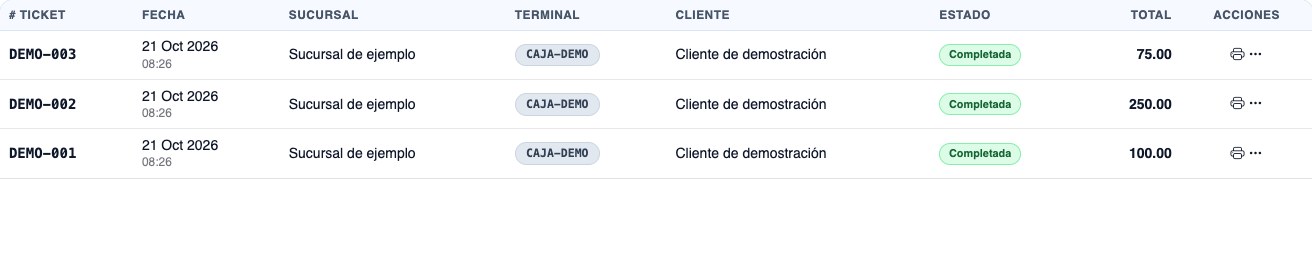
Review tickets, terminals, statuses and amounts in the sales list. Use that context to follow up on payments and shift closing.
A connected workflow
Identify the terminal, branch and authorized user. Record opening cash to separate takings during the shift from opening funds.
Review products, quantities, customer and totals. Confirm payments and view the receipt; the sale is linked to cash and inventory.
View sales and payments for the period, count cash and compare expected and counted amounts. Retain differences and the staff member responsible for closing.
In daily operations
Prepare branches, registers, users, products, currency and payment methods. Review taxes and document series with your company’s accounting lead.
Review each device’s model, operating system and connection. Test the scanner and 58 or 80 mm paper profiles; compatibility is confirmed using your actual equipment.
Validate opening, sale, payment, return and closing with examples. Included modules, equipment, migration, training and support are detailed in each quote.
Before implementation
Yes. The scope can include separate terminals and cash sessions by branch, with users and permissions defined for each operation.
The POS can be configured for cash, cards and transfers, with references and destinations where applicable. Recording a payment does not process it through a banking gateway; integrations are reviewed in the quote.
There are 58 and 80 mm printing profiles. Compatibility depends on the model, operating system, connection and configuration, and is validated with actual equipment. Barcode scanners are also tested in your intended workflow and browser.
Yes. Confirmed sales affect stock for the configured operation. A demonstration can include the sale and its corresponding inventory movement.
Gather your company and branch details and the documents you will use. Review taxes, series and authorization details with your accounting lead and validate an example before issuing real documents.
The pricing page shows the current per-user rate. Included modules, extras, device setup, data, training and implementation are defined in each quote.
Your implementation